Wire a Pocket Option postback to ramztracker
Track Pocket Option registrations and deposits with zero code: build the postback URL, map the macros, dedup with eid, and confirm the deposit amount lands.
Pocket Option (and most affiliate networks) can fire a server-to-server postback when a tracked user registers or deposits. ramztracker accepts those directly on GET /e — no code, just a URL with macros.
1. Build the postback URL
Grab your ingest token from the API keys page — rotate ingest, then copy a ready-made postback URL:
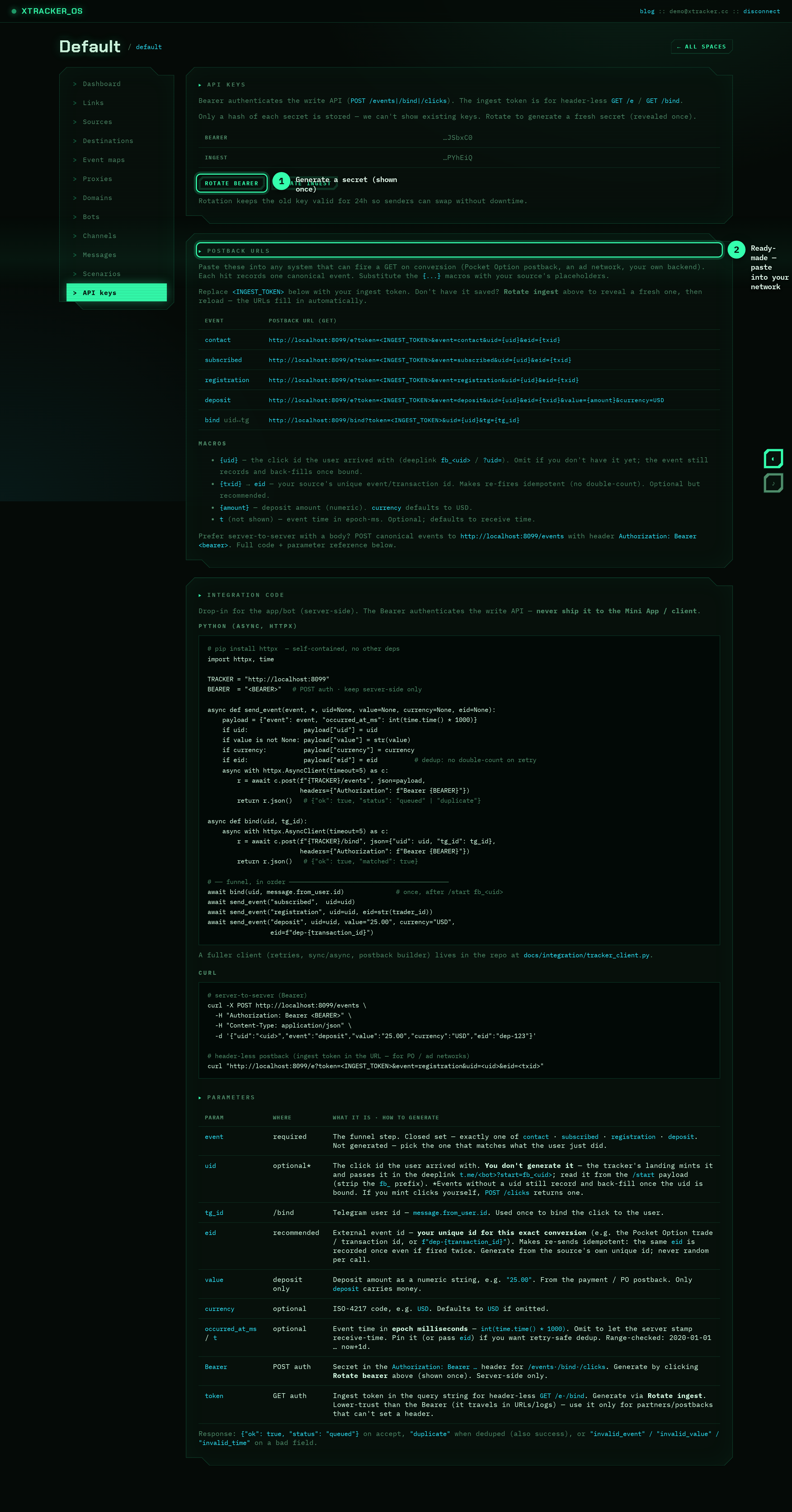
Use this shape:
https://xtracker.cc/e?token=<INGEST_TOKEN>&event=registration&uid={click_id}&eid={trade_id}
For a deposit, include the amount and currency:
https://xtracker.cc/e?token=<INGEST_TOKEN>&event=deposit&uid={click_id}&value={amount}¤cy=USD&eid={trade_id}
Paste this into the network's postback field, then replace each {...} with that network's own macro.
2. Map the macros
Every network names its macros differently. The mapping is what matters:
| ramztracker param | What to put there |
|---|---|
uid |
the click identifier you passed into the offer link (your uid) |
eid |
the network's unique transaction/trade id — used for idempotency |
value |
the deposit amount macro (deposit postbacks only) |
currency |
usually static USD, or the network's currency macro |
So a Pocket Option deposit postback might look like:
https://xtracker.cc/e?token=<INGEST_TOKEN>&event=deposit&uid={sub_id}&value={sumdep}¤cy=USD&eid={trade_id}
where {sub_id}, {sumdep} and {trade_id} are the network's placeholders.
3. Why eid matters here
Networks often re-fire a postback (retries, status changes). Without protection you'd count the same deposit several times and inflate revenue.
Passing eid with the network's unique transaction id makes the call idempotent: the same eid is stored exactly once, no matter how many times it fires — and regardless of the timestamp. Always set it for deposits.
No
eid? ramztracker falls back to deduping on the event time. That's fine for a single clean fire, buteidis the safe choice.
4. Confirm the deposit amount
A deposit must carry money. After a test fire, check the dashboard:
- the revenue widget moves by the deposit amount,
- the event shows up in the live feed as
deposit → <destination>, - the by-link table revenue increments.
If revenue stays flat, the value macro probably resolved empty — open the event in the dashboard and check the recorded value.
5. Response codes
GET /e returns JSON you can log on the network side if it supports it:
{"ok": true, "status": "queued"}
queued— accepted, new.duplicate— deduped (sameeid/time). Also a success.invalid_value— the amount wasn't a number.invalid_time— a suppliedtwas implausible (omittto use receive-time).
That's it — registrations and deposits now flow from Pocket Option into your funnel and on to your destinations. For the in-app (bot) side of the funnel, see the integration guide.
Keep reading
How to find and fix the leak in your funnel
A practical walkthrough: use the funnel breakdown and conversion gauge to pinpoint exactly where users drop off, form a hypothesis, fix one thing, and measure the lift.
PlaybookKeep your finger on the pulse: real-time conversion monitoring
A live dashboard isn't a vanity metric — it's an early-warning system. Here's how watching conversions in real time catches broken funnels and dead campaigns before they burn your budget.
PlaybookSame budget, more deposits: optimizing creatives with per-link data
Clicks lie. Deposits don't. Use per-link attribution to see which creative actually drives revenue — then move spend to the winner and kill the losers.